Updated October 14, 2020
A map of the network design (Network Topography)
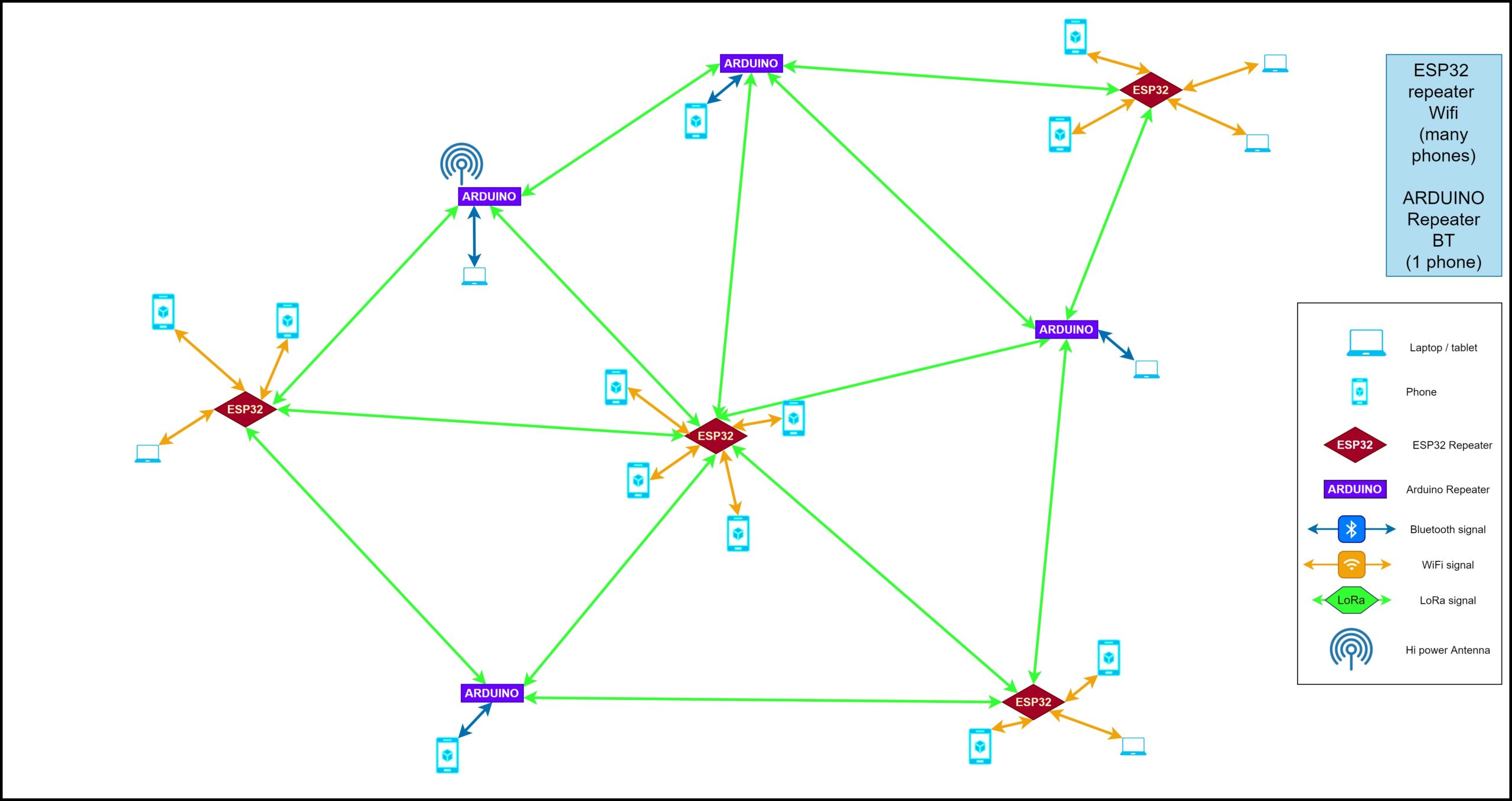
(Draft language: In the case of our San Rafael to Richmond connection, a high power antenna will probably be used.)
Map above shows how we are using arduinos to bridge the LoRa signal between the esp32 modules. Ideally, there will be a bit of overlap between the ranges of the esp32s, to enable anyone with a wifi enabled device to access our text messaging page.
Index:
- Introduction to this project and what we are trying to build
- System Requirements for our LoRa Network
- Part lists and Software for our “Pylons”:
“Pocket Pylons” (pocket-sized repeaters that you can carry around with you) and fixed “Pylons” (fixed repeaters that are used to carry the LoRa signal longer distances and act as “bridges” between the wifi-enabled repeaters that anyone with a phone can access). - Our LoRa software (for our “pocket node” prototypes & potentially other LoRa-compatible hardware)
- Antennaes
- Software Libraries
- Next Steps
- Additional Features for next version
- Definitions of some basic terms to help people new to the project understand what we are doing
- LoRa References
Coming soon:
Introduction
Problem:
What if the internet and cell phone towers went down for more than a few hours – or during an emergency situation when no communication for several hours could mean lives lost?
Proposed Solution:
To build a LoRa (Low Frequency Radio) network using a combination of “pocket pylons” (repeaters that are carried in peoples’ pockets or, with a larger antenna, in backpacks) and “fixed pylons” (fixed repeaters that forward the signal).
The pocket pylons (esp 32s) will have wifi access points on them for any wifi-enabled device to connect to. The fixed pylons are arduino-based and only have the ability to connect via bluetooth to one device at a time.
- We will build an “Emergency LoRa Network.”
- We have written software here to enable users to send text messages, either one to one or one to everyone on the network, over their cell phones.
- A LoRa network is a “low power radio network” (using the LoRa protocol).
- We will design our devices to be easily rechargeable from 5v solar panels.
- To enable our network to function optimally with large crowds in a setting with lots of building, we will create mobile “pocket pylons” – for which we have just built two working prototypes.
System Requirements for LoRa network
Our network design utilizes a combination of “fixed pylons” (fixed repeaters) placed mostly on the roofs and outside of buildings and “pocket pylons” (mobile repeaters that live in peoples’ pockets and backpacks) to allow for more “hops” across the network.
The pocket pylons will also provide wifi so that any wifi-enabled device can connect to the LoRa network and send and receive messages over it.
Power requirements – Using a Solar panel to recharge the battery
Although we will connect a battery to our pocket and fixed pylon repeaters, the battery will quickly run out if it is not supplemented by a solar panel that recharges the battery during the day. For this reason, we have integrated a solar panel into the design.
Note that, for the pocket pylons, it is more likely that you will want to use an additional battery or two to keep your pylon going over the course of the day, rather then depend on a solar panel being able to recharge it successfully while you are walking around. For fixed pylons however, especially those living on roof tops, a 5v solar panel will do quite nicely at keeping the battery charged.
These “pocket pylons” that we are building are able to use a 5v solar panel as-is. (5.6v is also within tolerances)
Remember to plug in your batteries and let them charge overnight the night before you assemble your repeaters. This will ensure that it’s charged up as much as possible.
The way this works, is by placing the battery in-between the esp32 module and the solar panel, allowing the solar panel to keep the battery charged.
Note: Neither the ESP32 nor the Arduino is able to be powered directly from the panel, because solar panels don’t collect at a constant voltage. So, if you purchased say, a 5 watt solar panel, it’s really going to be collecting at 4.5 watts on some days and 5.6 watts on other days, but the devices that need to be powered require a consistent 5 watt stream.
Prototypes
We have created two different prototypes. A more expensive option that does not require any soldering, and an arduino-based model that requires soldering and, ideally, the use of a special circuitboard that we are designing and potentially mass-producing, to lower the price and make the option easier to implement. (Kits coming soon)
Our “pylons” are very simple devices that do one of three things:
1. I have a list of phones/computers that are connected to me directly
2. I have received a message that is for one of these: i will send it to that device
3. I have received a message that is not for one of these: i’m going to re-transmit it, so that it may get where it has to go”
The above is true whether there ARE endpoints (phones, pc’s) connected to the node or not, so it can always be the same bit of hardware.
The “I’m going to re-transmit” part can be done stupidly (everyone spams out what they received as long as they don’t do it more than once) or smart (use timestamp or gps or both to make a good guess of where it has to go).
In a mesh network like we are describing, each node is also a router, and re-transmitting is handled via routing.
A node also provides a gateway from other devices (via BLE or WiFi) INTO and OUT OF the mesh network, and also provides routing WITHIN the mesh.
Part lists and Software for our Prototypes:
Part lists and Software for our “Pylons”:
“Pocket Pylons” (pocket-sized repeaters that you can carry around with you) and “Fixed Pylons” (fixed repeaters that are used to carry the LoRa signal longer distances and act as “bridges” between the wifi-enabled repeaters that anyone with a phone can access).
Note that for these options below, identical hardware is used for the repeater/transmitter parts – whether you are making a “pocket pylon” – that uses a smaller antenna, a “backpack pylon” with a larger antenna, or a “fixed pylon”(yeah, we couldn’t resist) – that you wish to place on top of a building or somewhere else outside, for better reception and range.
Option 1 – ESP 32 (LoRa Repeater that is wifi-enabled)
Hardware:
915MHz ESP32 LoRa 0.96 OLED Development Board SX1276 WiFi Bluetooth Transceiver Module + LoRa Antenna +JST Connector for Arduino LoraWan IOT Internet of Thing (Pack of 2) https://www.amazon.com/gp/product/B086ZG25DZ/ref=ppx_yo_dt_b_asin_title_o03_s00?ie=UTF8&psc=1
ESP32 LoRa 32 (V2), ESP32 Development Board WIFI Bluetooth LoRa Dual Core 240MHz CP2102 with 0.96inch OLED Display included 868/915MHZ Antenna for Smart Cities, Smart Farms, Smart Home, and IoT Makers https://www.amazon.com/gp/product/B076MSLFC9/ref=ppx_yo_dt_b_asin_title_o00_s00?ie=UTF8&psc=1
Software:
A zip file with software for either the esp32 or arduino models is available here: https://github.com/AaronSwartzDay-SSP/LoRa
Kits from Robots Everywhere with everything needed for the Arduino option
COMING SOON
Option 2 – Arduino (LoRa Repeater w single bluetooth connection)
The same basic repeater – that literally uses the same software – but this one requires a bit of soldering, and is made using an inexpensive arduino and a semtech chip.
The nice thing about this particular arduino is that it costs $1 if you buy more than 50.
We are designing and potentially mass producing a larger, pre-made circuit, for use with the arduino options – will make it easier for people to put together.
Our LoRa software (for our “pocket pylon” prototypes & potentially other LoRa-compatible hardware)
Transceiver software
The Transceiver code is packaged in with everything else on our github here:
https://github.com/AaronSwartzDay-SSP/LoRa

Wifi App for Texting Software
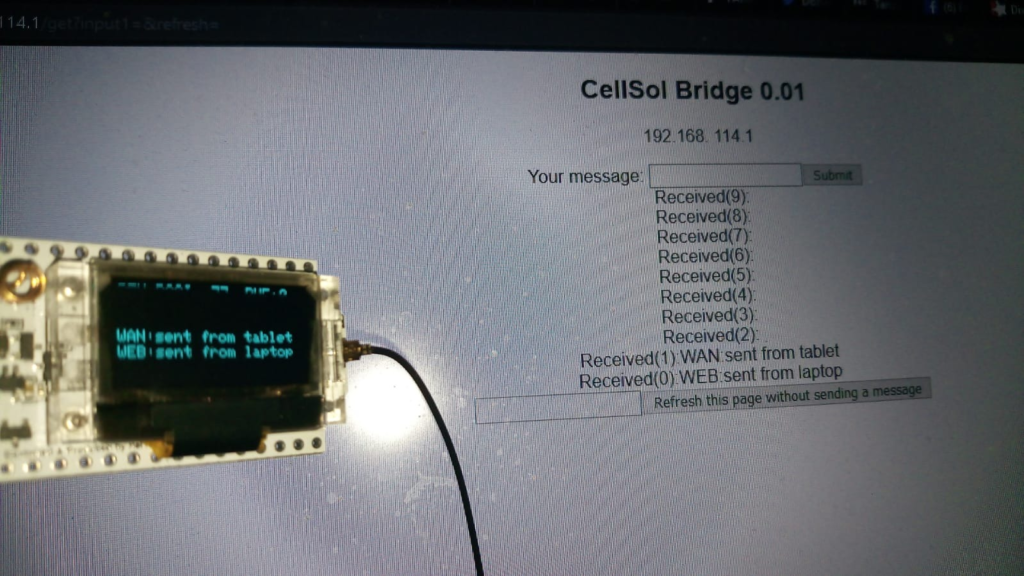
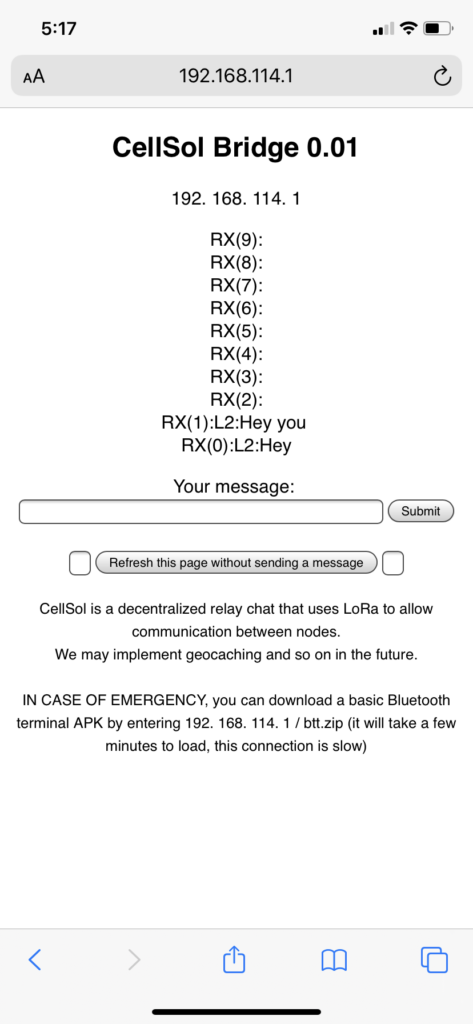
This software interconnects between a com port (or more than one), a really derpy website that shows the last 10 messages and lets you input one (over LoRa). The cool thing is that it just works ™ – even on old cell phones. The site even loads on a G1 phone from 2009
Link to our software, which includes a wifi app with texting software, on github here: https://github.com/AaronSwartzDay-SSP/LoRa
This firmware, written by Matteo Borri and Riley August, should work on most existing LoRa modules. (We suggest using a LoRa 32 heltec modules)
This software works for up to 8 wifi-enabled devices at a time.
Here’s a little model of what we are building:
—-fones
——gateway
——–repeater
——–repeater
——–repeater
——gateway
—-fones
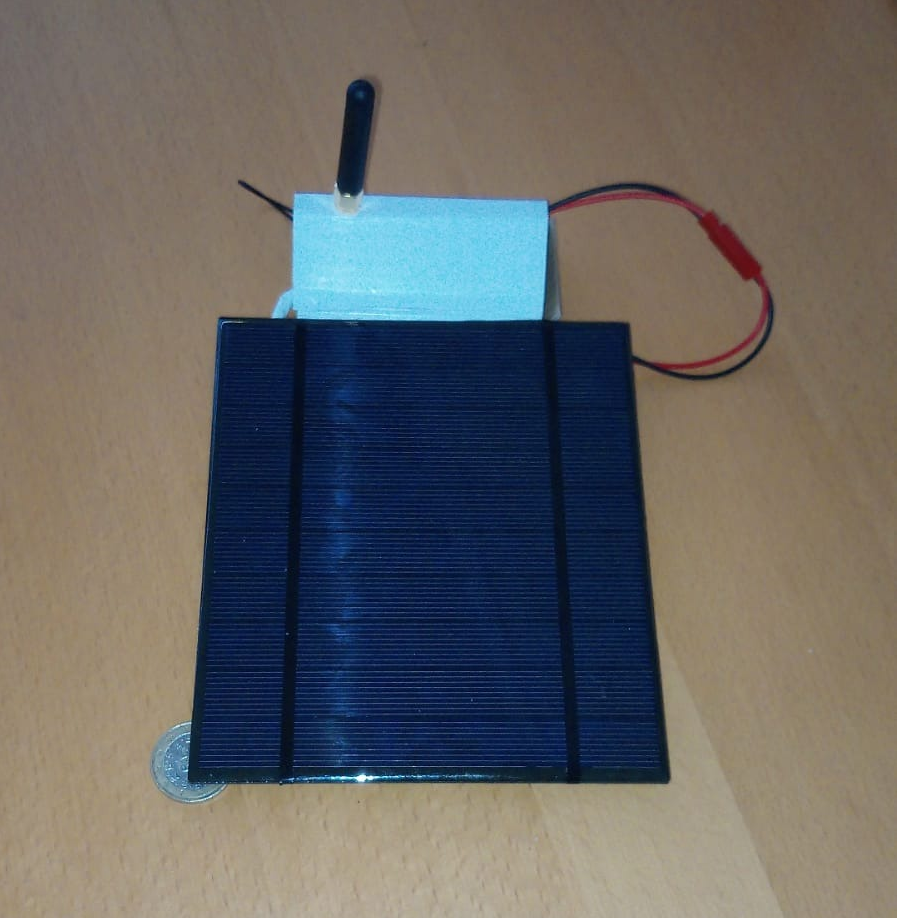
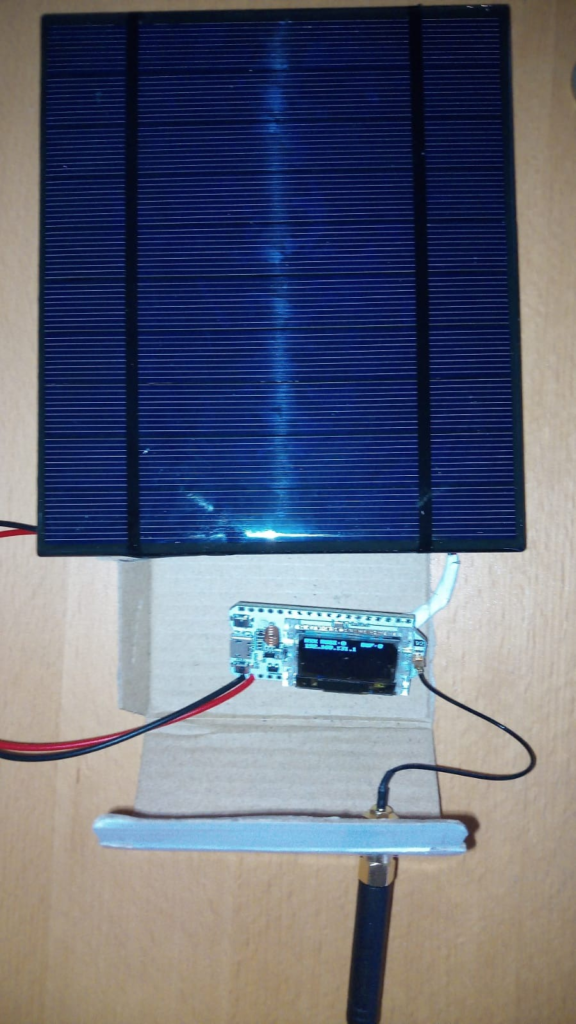
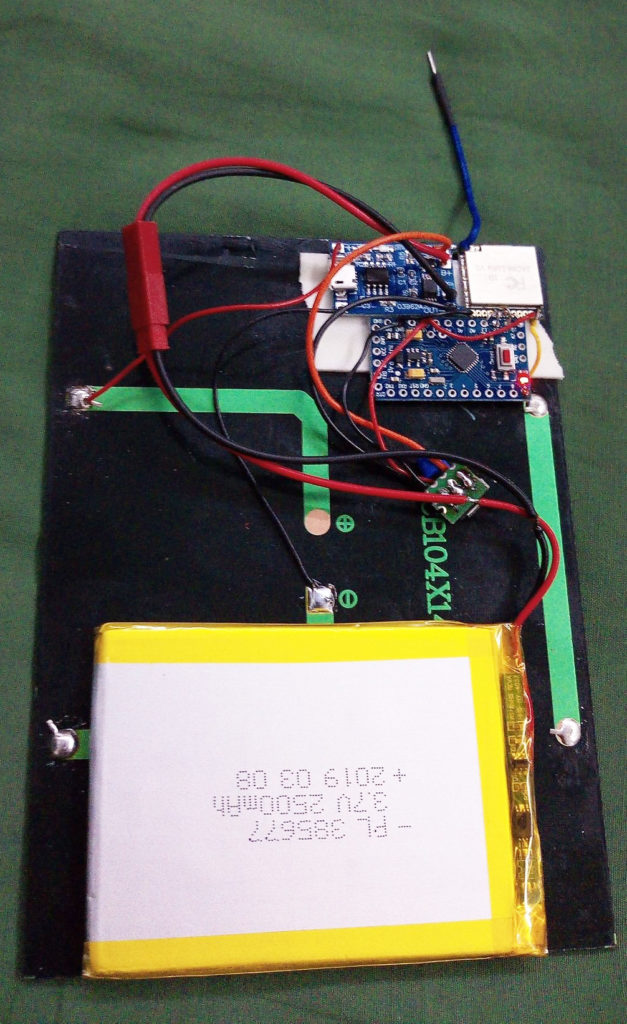
This basically bridges LoRa, wifi (via a derpy webpage although i guess we can do telnet/ssh) and the uarts on the controller. Wiring is just 5v to panel, with the zener diode across the leads.
Note that the internal resistance of the panel is sufficient to prevent fuckups.
Note that the battery in the above photo was harvested from a dead ipad. We added wifi using some 5.1 volt zener diodes.
Option 2: Arduino-based (requires soldering)
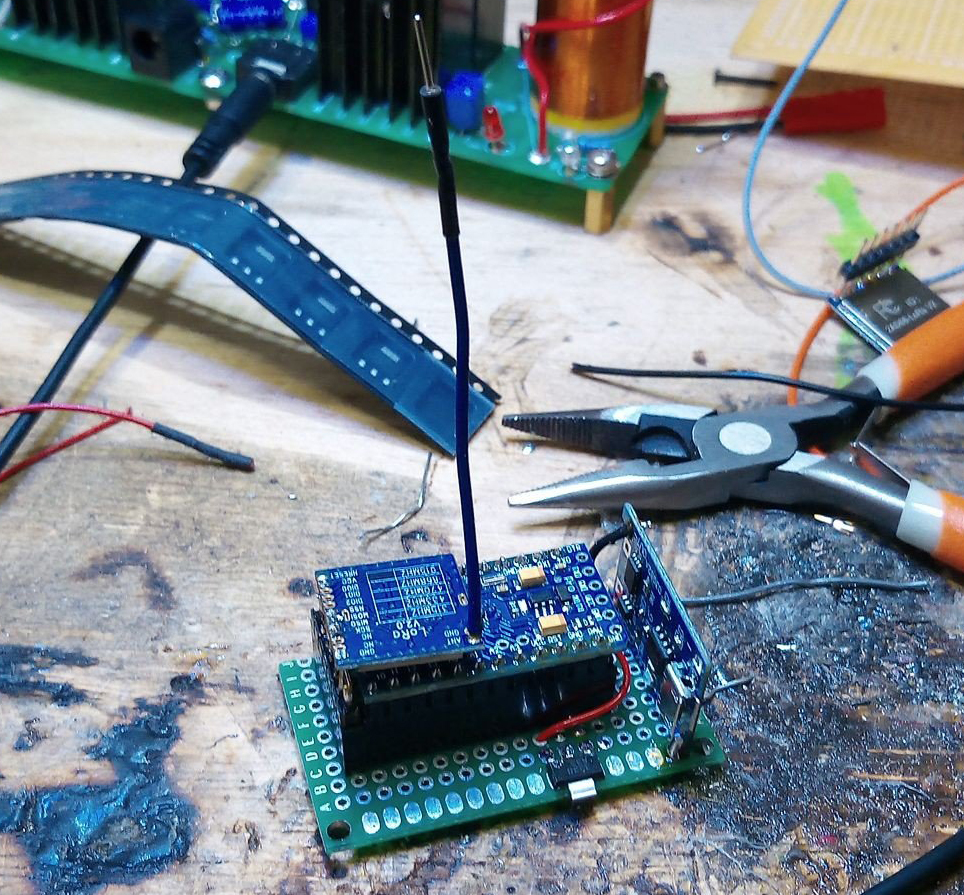
(uint8_t NSSPin = 10, uint8_t NRESETPin = 9
nss = pin10 (can be moved)
reset = pin9 (can be move)
sck = pin13 (cannot be moved)
mosi = pin11 (no)
miso = pin12 (no)

Bluetooth adapters (for the arduino boards)
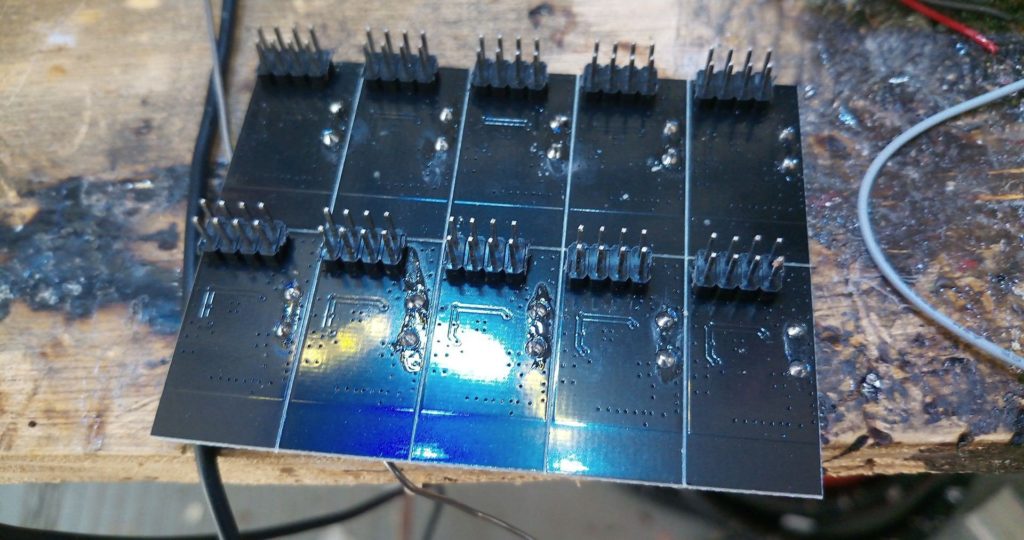

Bluetooth modules that are easy to hook up to the arduino: HC05




Licensing
The RadioHead library uses GPL 3.0, which requires us to make everything we use it with also available under GPL 3.0.
Captive Portal Implementation
We are building capabilities into our little wifi access points so that a user will automatically redirect to our desired homepage upon accessing the network.
There are several different ways that this can be accomplished (and we’d love to hear more). So far we have:
- There’s an HTTP redirect
Usually used when people are already using a well known URL that you don’t want to change, rather than a user that is firing up their client for the first time on the network, but still deserves to be on the list until we rule it out. - User’s can be redirected to our desired IP address at the router level. This is how most “Captive Portals” as these are known as, are implemented. A “captive portal” is what you deal with when you access any corporate network – for instance, at a hotel, the airport, or when you’re somewhere like whole foods – it makes you login or give a code or do whatever so you will be allowed to access anything else on the network.For us, we’re not trying to limit what people can access, since there’s nothing but our stuff on this network – although that might be a useful tool in the future, if resources are limited and a certain page accessible on the LoRa network is hogging all the bandwidth :)For us, we’re just trying to make it easy for new users to find the only page that exists, by taking them there automatically when they fire up their browser.
Antenna Info
Matteo has created a 3D printable antennae stand (need link to file here) that also doubles as a ruler for measuring just the right length of wire to use for the best reception of a specific frequency.
Link to 3D printer file for the antennae stand here
photo
idea is that you use the 3d printed part both as the whip antenna holder and as a meaasure to cut the antenna wire with
Our LoRa network uses 915MZ as its frequency. Different frequencies will use different lengths of wire on our antennae ruler/stand. You can use the ruler to measure exactly the right length of wire for your antennae, before you cut it. (You can use this tool to make a better antennae for your wifi router too this way.)
1) Print out our antennae stand/ruler for frequency wire length tool
2) Use the tool to measure the desired length of wire for your antennae, and cut it
3) Slide the wire through the antennae stand
4) Connect the antennae to your LoRa repeater or Wifi Router
Be careful where you place your repeater, as the antennae itself can shadow the solar panel and interfere with it’s ability to capture power from the sun.
This antennae is supposed to work for longer distances, like 25 miles – and our software is already configured to work with it: https://www.digikey.com/en/products/detail/digi/XBP9B-XCST-001/3482817
When it’s time to actually make your antennae, go here: https://www.aaronswartzday.org/givemelora/#antennaes
More info about antennae here:
Antennas
http://www.shopantenas.com.br/antena-movel-uhf-5-8…
Antenna mount:
http://www.shopantenas.com.br/suporte-magnetico-preto-p–antena-movel/p
Note: You generally want to use as big of an an antenna as is possible while still being practical to carry around (in the case of a pocket pylon).
For the fixed “pylon” repeaters, there is a concern that the antennae aren’t so big as to draw too much attention – as is the reason for keeping the size of the solar panels used as small as possible. (So they don’t get stolen.)
Next Steps
1) make a basic repeater with just an arduino and a semtech chip
(get a POS $1 arduino to do repeater things) Note: ideally, these will be able to be made cheaper than our original prototype (see pics above) – and, most importantly, will use a lot less power.
2) Getting an antenna reasonably high up where Matteo is – in San Rafael – (~1.5-2m above building) – so we can try some long range tests.
Additional Features for next version
Re: encryption
Sure. Eventually, it would be nice to have some encryption available for sensitive messages. Right now, we think it would be more useful to be able to say “I’m here help” over an open network than to have no options at all.
re: bulletin boards
Since we are dealing with slow model speeds, someone suggested implementing a bulletin board system of sorts. So Matteo build one. This “bulletin board” is just a little website that has only has 10 message slots but there can be up to 255.
Why a bulletin board system? Because LoRa is as slow as some of the earliest modem speeds – 9600 baud or lower even – so why not go back to the types of communication platforms that were used in the 90’s when bandwidth was going that slow.
Software Libraries (we used to write our node software)
RadioHead Packet Radio library for embedded microprocessors
http://www.airspayce.com/mikem/arduino/RadioHead/
This is the RadioHead Packet Radio library for embedded microprocessors. It provides a complete object-oriented library for sending and receiving packetized messages via a variety of common data radios and other transports on a range of embedded microprocessors.
The version of the package that this documentation refers to can be downloaded from http://www.airspayce.com/mikem/arduino/RadioHead/RadioHead-1.107.zip You can find the latest version of the documentation at http://www.airspayce.com/mikem/arduino/RadioHead
Definitions of some basic terms to help people new to the project understand what we are doing
Access point:
Gateway:
Router:
Repeater:
Wifi:
Bluetooth:
LoRa:
Word Compression Consideration
Why might we want word compression for our LoRa network?
The “commercial code” below is one of several methods that one can use to achieve excellent “word compression” for english words. “Word compression” is a concept that originated during the old days of telegrams and systems where you paid for every word to be transmitted. In our case, every word counts because our network bandwidth is so limited – and is literally as slow as the old dial-up modems of the 90s. (As slow as 9,600 – 12,000 baud modems)
These codes are examples of what is called “dictionary compression.” An application is written in such a way that it recognizes common phrases, like “what time should we meet?” and assigns it a code that will necessitate transmitting fewer characters.
The way it works: The application (in this case our texting app & bulletin board app) – recognizes the phrase the person has typed and then uses a shorter abbreviation to represent it – sends the code (that uses less characters) across the network – where it is decoded on the receiver’s side into the original message. This is similar to the autocorrect functions that everyone is used to using on their phones.
What would creating our own codes involve?
Creating our own codes would involve determining the 32768 most common words in english – perhaps algorithmically.
Why don’t we use lossless text compression then instead of codes?
Because compression not optimized for text doesn’t go very far for short messages. To demonstrate this concept, one can take any one sentence typed here, save it as a text file, zip the text file, and see that it won’t be much shorter.
Why are we discussing this for this project?
(This subject came up because there’s a big emphasis in sending as few bytes as possible on the LoRa discussion forums.)
Let’s say that we take the most common 32768 words in the english language (the other 32767 are pairs of ASCII characters that disallow control characters, so losing one bit out of 16 i not a big problem). Now each word, or even common phrase, if we want, fits two bytes. You can even do a bit of cleanup so that “how are you” and “how r u” and so on map to the same thing, and are printed “how are you” at the receiving end unless tagged “verbatim.” [? (Note: we haven’t discussed tagging messages? let’s! :) ?]
Note: This is done phone/pc side where you have a lot of hard disk space for a dictionary and a lot of cpu power for realtime substitution.
Note: Interestingly, you can even XOR the -dictionary- with a crypto key for private messaging, and if you swap those often enough, that’s your encryption solution. (Not unbeatable of course, but since it can be of arbitrary length, you could even have a one time pad, which IS unbeatable by definition). This type of “encryption” won’t slow things down as much, as it’s just a XOR operation that you do once on the dictionary. So, not unbeatable, but decent. And not super secure in that it requires a shared key, but eh.
Lisa thinks it sounds like a project in itself, but Matteo thinks it’s not necessarily a big job, it’s just a case of finding out what the most common X words in Y language are, and sorting them. Or you can just scrape a dictionary and sort it alphabetically if you are lazy.
Commercial code (communications)
https://en.wikipedia.org/wiki/Commercial_code_(communications)
“In telecommunication, a commercial code is a code once used to save on cablegram costs.[1] Telegraph (and telex) charged per word sent, so companies which sent large volumes of telegrams developed codes to save money on tolls.”
For Later:
Other LoRa Hardware
Hardware we think might work, if we create a LoRa gateway for it
The Ark
https://github.com/thearkadia/The_Ark/blob/master/README.md
LORA1276|FCC|CE|868 915MHz|100mW|Lora module|wireless RF module| long range transceiver module
https://www.nicerf.com/product_146_136.html
LoRa Install Guide
Installing our LoRa software on your esp32
Arduino firmware install instructions
More detailed instructions for both models are here: https://www.aaronswartzday.org/lorasetup
The esp32 does not have a toolkit, but you can use the arduino toolkit with a plugin module to get it to work on the esp32. (add links)
1) On your computer, install the arduino toolkit, and the esp 32 plugin that works with the arduino toolkit.
2) Use the toolkit to put our LoRa software on your device.
3) Take any web-enabled device and fire up a browser type in the IP address 192.168.x.1
4) Type in your message in the form field and click “send” – to send a message to everyone on the network that also has the page loaded.
5) Users can refresh the page to see new messages.
The page will save and display the last 10 messages sent. (We are working on having a second page that displays the last 100 messages.)
Troubleshooting Info
Troubleshooting Info here
Tech Support
contact: cellsol@robots-everywhere.com